# YTThirdPlatformManager
**Repository Path**: wj0410/YTThirdPlatformManager
## Basic Information
- **Project Name**: YTThirdPlatformManager
- **Description**: iOS第三方平台集成组件化
- **Primary Language**: Objective-C
- **License**: Not specified
- **Default Branch**: master
- **Homepage**: None
- **GVP Project**: No
## Statistics
- **Stars**: 0
- **Forks**: 7
- **Created**: 2017-11-15
- **Last Updated**: 2020-12-19
## Categories & Tags
**Categories**: Uncategorized
**Tags**: None
## README
# YTThirdPlatformManager
iOS第三方平台集成组件化(1.0.1 版本)
**历史版本**
[iOS第三方平台集成组件化(1.0.0 版本)](https://gitee.com/dhar/YTThirdPlatformManager/wikis/ytthirdplatformmanager-1.0.0-readme)
### 原理分析
参考我的博客文章[iOS第三方平台集成组件化](https://my.oschina.net/u/1242477/blog/1557875) 和 [iOS第三方平台集成组件化续集](https://my.oschina.net/FEEDFACF/blog/1573080)
### 怎么使用
#### 配置
定位到Demo所在的Example目录
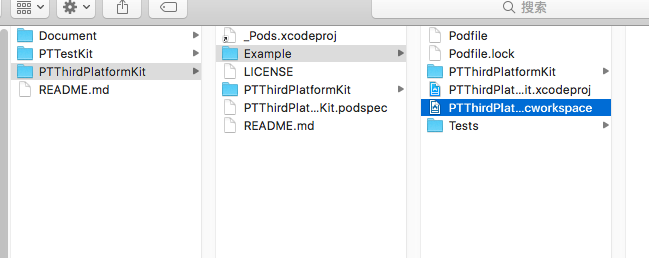
运行 `pod install` 命令安装依赖库
```ruby
➜ Example git:(master) pod install
Analyzing dependencies
Fetching podspec for `PTFoundation` from `../../PTFoundation`
Fetching podspec for `PTTestKit` from `../../PTTestKit`
Fetching podspec for `PTThirdPlatformKit` from `../`
Downloading dependencies
Using PTFoundation (0.1.0)
Using PTTestKit (0.1.0)
Using PTThirdPlatformKit (0.1.0)
Installing SDWebImage (4.2.2)
Installing WechatOpenSDK (1.8.0)
Installing WeiboSDK (3.1.3)
Installing YYModel (1.0.4)
Generating Pods project
Integrating client project
Sending stats
Pod installation complete! There are 3 dependencies from the Podfile and 7 total pods installed.
```
安装完成打开 `PTThirdPlatformKit.xcworkspace` 文件即可
#### 示例代码
第三方平台配置,在AppDelegate的`didFinishLaunchingWithOptions`方法中进行平台的配置
```objc
- (BOOL)application:(UIApplication *)application didFinishLaunchingWithOptions:(NSDictionary *)launchOptions
{
// 第三方平台注册
[[PTThirdPlatformConfigManager sharedInstance] setPlaform:PTThirdPlatformTypeWechat appID:kWXAppID appKey:nil appSecret:kWXAppSecret redirectURL:nil];
[[PTThirdPlatformConfigManager sharedInstance] setPlaform:PTThirdPlatformTypeTencentQQ appID:kTencentAppID appKey:kTencentAppKey appSecret:kTencentAppSecret redirectURL:nil];
[[PTThirdPlatformConfigManager sharedInstance] setPlaform:PTThirdPlatformTypeWeibo appID:kWeiboAppID appKey:kWeiboAppKey appSecret:kWeiboAppSecret redirectURL:kWeiboRedirectURI];
[[PTThirdPlatformConfigManager sharedInstance] setPlaform:PTThirdPlatformTypeAlipay appID:nil appKey:nil appSecret:nil redirectURL:nil];
[[PTThirdPlatformConfigManager sharedInstance] thirdPlatConfigWithApplication:application didFinishLaunchingWithOptions:launchOptions];
return YES;
}
```
功能调用
下面是不同平台调用第三发SDK的登录、分享、支付的功能示例代码,具体的可以下载项目代码查看。
```objc
- (void)viewDidLoad {
[super viewDidLoad];
typeof(self) __weak weakSelf = self;
[self addActionWithName:@"QQ Login" callback:^{
[[PTThirdPlatformConfigManager sharedInstance] signInWithType:PTThirdPlatformTypeTencentQQ fromViewController:weakSelf callback:^(ThirdPlatformUserInfo *userInfo, NSError *err) {
}];
}];
[self addActionWithName:@"Wechat Login" callback:^{
[[PTThirdPlatformConfigManager sharedInstance] signInWithType:PTThirdPlatformTypeWechat fromViewController:weakSelf callback:^(ThirdPlatformUserInfo *userInfo, NSError *err) {
}];
}];
[self addActionWithName:@"Weibo Login" callback:^{
[[PTThirdPlatformConfigManager sharedInstance] signInWithType:PTThirdPlatformTypeWeibo fromViewController:weakSelf callback:^(ThirdPlatformUserInfo *userInfo, NSError *err) {
}];
}];
// 分享模型
ThirdPlatformShareModel* shareModel = [[ThirdPlatformShareModel alloc] init];
shareModel.image = nil;
shareModel.imageUrlString = @"";
shareModel.title = @"title";
shareModel.text = @"text";
shareModel.weiboText = @"weibo text";
shareModel.urlString = @"http://www.baidu.com";
shareModel.fromViewController = self;
shareModel.shareResultBlock = ^(PTShareType pplatform, PTShareResult result, NSError * error) {
};
[self addActionWithName:@"QQ Share" callback:^{
shareModel.platform = PTShareTypeQQ;
[[PTThirdPlatformConfigManager sharedInstance] shareWithModel:shareModel];
}];
[self addActionWithName:@"Wechat Share" callback:^{
shareModel.platform = PTShareTypeWechat;
[[PTThirdPlatformConfigManager sharedInstance] shareWithModel:shareModel];
}];
[self addActionWithName:@"Weibo Share" callback:^{
shareModel.platform = PTShareTypeWeibo;
[[PTThirdPlatformConfigManager sharedInstance] shareWithModel:shareModel];
}];
[self addActionWithName:@"Wechat Pay" callback:^{
PTOrderModel* order = [[PTOrderModel alloc] init];
[[PTThirdPlatformConfigManager sharedInstance] payWithPlateform:PaymentMethodTypeWechat order:order paymentBlock:^(BOOL result) {
}];
}];
[self addActionWithName:@"Alipay Pay" callback:^{
PTOrderModel* order = [[PTOrderModel alloc] init];
[[PTThirdPlatformConfigManager sharedInstance] payWithPlateform:PaymentMethodTypeAlipay order:order paymentBlock:^(BOOL result) {
}];
}];
```
### 怎么配置
#### SDK配置
项目已经添加了微信、微博、QQ的第三方SDK了,支付宝和QQ是使用framework包的方式导入,微信和微博使用Pod的方式导入,运行 `pod install` 即可导入微信和微博的SDK。这些平台的依赖库已经配置好了,所以不需要再次配置即可使用。
#### URL Types 配置
这些配置使用到的key或者APPID部分需要自行完善,其中,**调用支付宝支付的 URL Schemes 代码调用和URL Types中的配置要保持一致**。
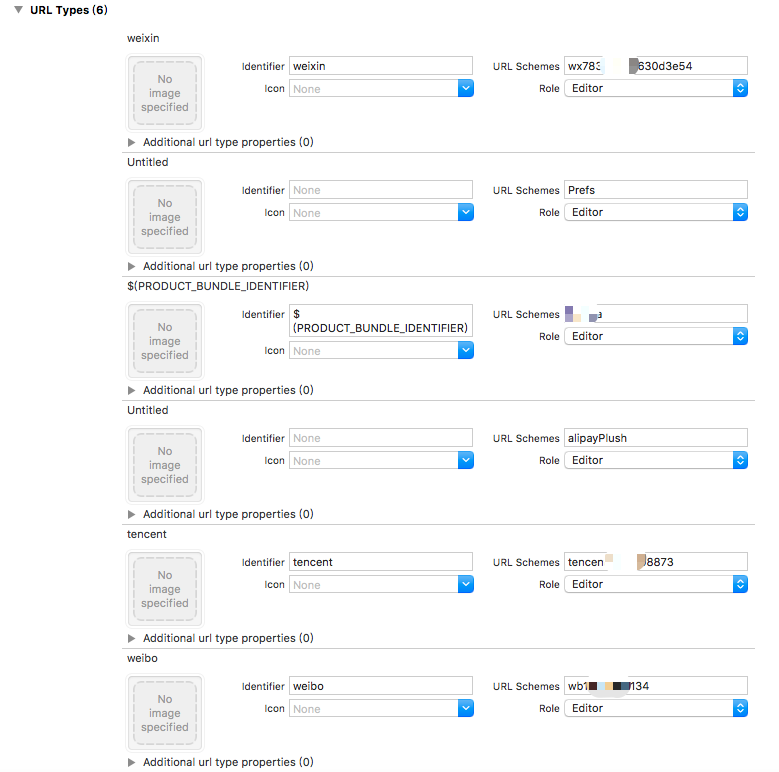
可以复制以下配置文件的内容,配置文件中只包含了微信、微博、QQ、支付宝的配置,修改对应平台的配置,粘贴到info.plist文件中,更多平台的配置需要参考对应平台的文档说明
```ruby
CFBundleURLTypes
CFBundleTypeRole
Editor
CFBundleURLName
weixin
CFBundleURLSchemes
你的微信APPID
CFBundleTypeRole
Editor
CFBundleURLSchemes
alipayPlush
CFBundleTypeRole
Editor
CFBundleURLName
tencent
CFBundleURLSchemes
你的QQAPPID
CFBundleTypeRole
Editor
CFBundleURLName
weibo
CFBundleURLSchemes
你的微博APPKEY
```
#### QueriesSchemes
APP调用第三方APP需要用到的,下面的配置文件配置了微信、微博、QQ、支付宝这几个第三方APP的调用,其中微信的配置需要填写你的微信APPID,如需要更多的其他第三方APP调用,参考第三方平台的配置添加即可。
```ruby
LSApplicationQueriesSchemes
wechat
weixin
你的微信APPID
mqqapi
mqq
mqqOpensdkSSoLogin
mqqconnect
mqqopensdkdataline
mqqopensdkgrouptribeshare
mqqopensdkfriend
mqqopensdkapi
mqqopensdkapiV2
mqqopensdkapiV3
mqzoneopensdk
mqqopensdkapiV3
mqqopensdkapiV3
mqzone
mqzonev2
mqzoneshare
wtloginqzone
mqzonewx
mqzoneopensdkapiV2
mqzoneopensdkapi19
mqzoneopensdkapi
mqzoneopensdk
tim
sinaweibohd
sinaweibo
sinaweibosso
weibosdk
weibosdk2.5
```
#### 扩展第三方SDK
添加了新的第三方SDK,在SDK配置这个步骤好了之后,需要做以下事情
- 继承`PTBaseThirdPlatformManager`类生成一个第三方SDK的管理器
- 实现`PTAbsThirdPlatformRequestHandler`接口生成一个第三发SDK的底层调用
- 继承`PTBaseThirdPlatformRespManager`类生成一个第三方SDK的响应回调
以微信平台为例,生成三个平台相关的类文件:

- 在配置中配置第三方平台管理类以及不同的类型对应的管理类
```objc
// 配置管理类的类名
- (NSArray*)thirdPlatformManagerClasses {
return @[@"PTAlipayManager",
@"PTTencentManager",
@"PTWeiboManager",
@"PTWXManager",
];
}
// 配置第三方登录支付对应的管理类
- (NSDictionary*)thirdPlatformManagerConfig {
return @{
@(PTThirdPlatformTypeWechat): @"PTWXManager",
@(PTThirdPlatformTypeTencentQQ): @"PTTencentManager",
@(PTThirdPlatformTypeWeibo): @"PTWeiboManager",
@(PTThirdPlatformTypeAlipay): @"PTAlipayManager",
};
}
// 配置第三方分享对应的管理类
- (NSDictionary*)thirdPlatformShareManagerConfig {
return @{
@(PTShareTypeWechat): @"PTWXManager",
@(PTShareTypeWechatLine): @"PTWXManager",
@(PTShareTypeQQ): @"PTTencentManager",
@(PTShareTypeQQZone): @"PTTencentManager",
@(PTShareTypeWeibo): @"PTWeiboManager",
};
}
```
完了之后可以回到`怎么使用`步骤查看怎么使用了。