# useDimensions
**Repository Path**: mirrors_silverwind/useDimensions
## Basic Information
- **Project Name**: useDimensions
- **Description**: A React Hook to measure DOM nodes
- **Primary Language**: Unknown
- **License**: Not specified
- **Default Branch**: master
- **Homepage**: None
- **GVP Project**: No
## Statistics
- **Stars**: 0
- **Forks**: 0
- **Created**: 2024-07-16
- **Last Updated**: 2026-05-17
## Categories & Tags
**Categories**: Uncategorized
**Tags**: None
## README
# useDimensions - a React Hook to measure DOM nodes
[![Travis][build-badge]][build]
[![npm package][npm-badge]][npm]
[![Coveralls][coveralls-badge]][coveralls]
[build-badge]: https://img.shields.io/travis/user/repo/master.png?style=flat-square
[build]: https://travis-ci.org/user/repo
[npm-badge]: https://img.shields.io/npm/v/npm-package.png?style=flat-square
[npm]: https://www.npmjs.org/package/npm-package
[coveralls-badge]: https://img.shields.io/coveralls/user/repo/master.png?style=flat-square
[coveralls]: https://coveralls.io/github/user/repo
## Demo
[👉 check out demo page to see useDimensions in action](https://usedimensions.now.sh/)
## Backstory :P
The other day I wanted to measure some DOM nodes. This is useful when you have to align items, or respond to browser width, or ... lots of reasons okay.
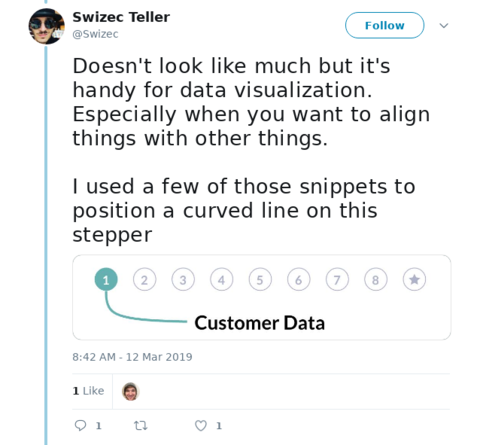
I had to align a curvy line with elements that aren't under my control. This little stepper component uses flexbox to evenly space circles, CSS layouting aligns the title, and you see where this is going.
[](https://twitter.com/Swizec/status/1105494223011241984)
SVG in the background detects position of itself, positions of the title and circle, and uses those to define the `start` and `end` line of my curve. 👌
Many ways you can do this.
@lavrton linked to [a list of existing NPM packages](https://www.npmjs.com/search?q=hook%20size) that sort of do it. @mcalus shared how [he uses `react-sizeme`](https://github.com/mcalus3/open-fraksl/blob/master/src/components/DomainComponents/DrawingComponents/FractalStage.tsx) to get it done.
All great, but I wanted something even simpler. I also didn't know about them and kind of just wanted to make my own.
Here's an approach I found works great
## useDimensions hook

Yep that's it. It really is that simple.
👉 [GitHub link](https://github.com/Swizec/useDimensions)
- `useRef` creates a React.ref, lets you access the DOM
- `useState` gives you place to store/read the result
- `useLayoutEffect` runs before browser paint but after all is known
- `getClientBoundingRect()` measures a DOM node. Width, height, x, y, etc
- `toJSON` turns a DOMRect object into a plain object so you can destructure
Here's how to use it in your project 👇
First, add `useDimensions` to your project
```
$ yarn add react-use-dimensions
or
$ npm install --save react-use-dimensions
```
Using it in a component looks like this
```javascript
import React from "react";
import useDimensions from "react-use-dimensions";
const MyComponent = () => {
const [ref, { x, y, width }] = useDimensions();
return This is the element you'll measure
;
};
```
`useDimensions` returns a 2-element array. First the `ref`, second the dimensions.
This is so multiple `useDimensions` hooks in the same component don't step on each others' toes. Create as many refs and measurement objects as you'd like.
```javascript
const MyComponent = () => {
const [stepRef, stepSize] = useDimensions();
const [titleRef, titleSize] = useDimensions();
console.log("Step is at X: ", stepSize.x);
console.log("Title is", titleSize.width, "wide");
return (
);
};
```
## Disabling live updates
By default `useDimensions` live updates its measurements on every scroll and resize event. This can lead to a lot of re-rendering, if you aren't careful.
I recommend feeding the dimensions you care about into your list of `useEffect` triggers. That is the best way to ensure good performance.
If however, you don't want that and know you just need to measure once, `useDimensions` supports an optional `liveMeasure` argument.
```javascript
const MyComponent = () => {
const [stepRef, stepSize] = useDimensions({ liveMeasure: false });
// useDimensions never updates and won't trigger re-renders
console.log("Step is at X: ", stepSize.x);
return (
);
};
```
# License
MIT License of course.