# angular-odm
**Repository Path**: mirrors_linslin/angular-odm
## Basic Information
- **Project Name**: angular-odm
- **Description**: :link: AngularJS Object Database Model
- **Primary Language**: Unknown
- **License**: Not specified
- **Default Branch**: master
- **Homepage**: None
- **GVP Project**: No
## Statistics
- **Stars**: 0
- **Forks**: 0
- **Created**: 2020-08-09
- **Last Updated**: 2026-05-16
## Categories & Tags
**Categories**: Uncategorized
**Tags**: None
## README
# angular-odm
AngularJS **O**bject **D**atabase **M**odel brings abstract model handling with locale storage "database" support. Pure model handling with local storage used as persistence. Angular-odm provides a bit logic of active record model handling known from popular MVC Frameworks.
## Installation
`bower install angular-odm`
## Demo
Check out this demo application here http://www.linslin.org/angular-odm-demo/.
Demo sourcecodes can be found here https://github.com/linslin/ng-odm-angularjs-demo.
## Quick controller examples
#### Load user data
```javascript
/**
* Load user on scope, init scope data.
*/
$scope.users = userModel.findAll();
```
#### Add a single record
```javascript
/**
* Add a user (no validation, simple)
*
* @param {object} user
*/
$scope.addUser = function (user) {
//Setup user model
userModel.ID = null;
userModel.firstname = user.firstname;
userModel.surname = user.surname;
userModel.email = user.email;
//Save to local storage db
if(userModel.save()) {
// success handling here
} else {
//error handling here
}
};
```
#### Delete a single record
```javascript
/**
* Delete a user by primary key
*
* @param {number} userId
*/
$scope.deleteUser = function (userId) {
//Delete user by primary key
if(userModel.deleteByPk(userId)) {
// success handling here
} else {
//error handling here
}
};
```
#### Delete all records
```javascript
/**
* Delete all users
*/
$scope.cleanupUsers = function () {
//Delete user by primary key
if(userModel.deleteAll()) {
// success handling here
} else {
//error handling here
}
};
```
## Handle your model abstract:
- model.save();
- model.update();
- model.findAll();
- model.findByPk();
- model.findByAttributes();
- model.findAllByAttributes();
- model.countAll();
- model.countByAttributes();
- model.deleteByPk();
- model.deleteByAttributes();
- model.deleteAll();
- model.validate();
## Configuration
Note that you need to configure your database and models to make angular-odm work. Here is a example structure on how your AnguarJS application could be build up with angular-odm. Maybe it helps.
```
.
+-- images
+-- scripts
| +-- config
| +-- odm.config.js
| +-- controllers
| +-- main.controller.js
| +-- models
| +-- user.model.js
+-- views
| +--main.html
+-- bower_components
| +-- .
| +-- ..
+-- bower.json
+-- index.html
```
#### Include the scripts (may included by bower automatically).
> One dependency over here: localStorageDB.
```html
```
#### Create ODM configuration
> The configuration module needs to be named `ODMConfiguration` with a constant defined as `ODM`. For example in a `app/config` directory. Naming is strict. All Database configurations will be placed here. Here is a example database setup with three tables in it.
> Database schema will automatically created on AngularJS application startup.
```javascript
/**
* angular-odm default configuration
*
* @name ODMConfiguration
* @author Nils Gajsek
* @copyright 2015 linslin.org
* @package angular-odm
* @version 1.0
*/
(function () {
//use strict -> ECMAScript5 error reporting
'use strict';
// ################################################ AngularJS Module define // #####################################
/**
* ODM constant, ODM default main configuration.
*
* @name ODMConfiguration
*/
angular.module('ODMConfiguration', []).constant('ODM', {
dbSchema: {
name: 'exampleDb',
tables: [
{
name: 'user',
resetOnInit: false,
columns: [ // localStorageDB is automatically adding a unique ID attribute to every table.
{name: 'firstname', type: 'text'},
{name: 'surname', type: 'text'},
{name: 'email', type: 'text'},
{name: 'web', type: 'text'}
]
},
{
name: 'userGroup',
resetOnInit: false,
columns: [ // localStorageDB is automatically adding a unique ID attribute to every table.
{name: 'title', type: 'text'}
]
},
{
name: 'userGroupHasUser',
resetOnInit: false,
columns: [ // localStorageDB is automatically adding a unique ID attribute to every table.
{name: 'userId', type: 'integer'},
{name: 'groupId', type: 'integer'}
]
}
]
}
})
})();
```
#### Create your models.
> You will need to define your model and its attributes which will associate with localStorageDB. You could do that in a `app/model` directory. Define your model attributes by using `self._attributes`. Hint that `self._attributes` object needs to be defined database configuration as well, else the model will not be persisted in locale storage.
> Change `self._table` to connect a model to a datebase table which should be defined in `ODM` configuration constant.
```javascript
/**
* User model
*
* @name model.user
* @author Nils Gajsek
* @copyright Nils Gajsek
* @package angular-odm
* @version 1.0
*/
(function () {
//use strict -> ECMAScript5 error reporting
'use strict';
// ################################################ angularJS Module define // #####################################
/**
* User Model, Application model.
*/
angular
.module('model.user', []) // [-_-]
.factory('userModel', ['$odm', userModel]);
/**
* User model object
*
* @param {object} $odm
*
* @returns {self}
*/
function userModel($odm) {
//Init object
var self = this;
//define model object table
self._table = 'user';
//define model attributes configuration
//every attribute is access able via "modelclass.attributeKey"
// HINT: "modelclass.ID" is automatically added by localStorageDB
self._attributes = [
{name: 'firstname', type: 'text'},
{name: 'surname', type: 'text'},
{name: 'email', type: 'text'},
{name: 'web', type: 'text'}
];
//Init model and return -> will merge modelChild and parent class
return $odm.model().getInstance().init(self);
}
})();
```
#### Include application module dependencies
Add those modules into your application main module like in the following example. Don't forget to load your resources into dom. =)
```javascript
angular
.module('angularDemoApp', [
'ngRoute',
'ngOdm',
'ODMConfiguration',
'model.user'
])
```
# Documentation
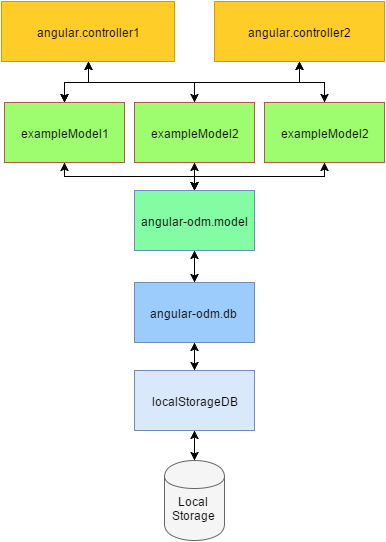
## Abtract hierarchy object diagram
## Primary key handling
A primary key and its attribute is automatically generated by localStorageDB on all models. You can access the primary key via `model.ID`.
```javascript
console.log(model.ID);
// null|number
```
## DB configuration
You need to setup a strict database configuration AngularJS module named `ODMConfiguration` including a constant named `ODM`. Please add `ODMConfiguration` module into your main application module like `angular.module('angularApp', ['ODMConfiguration'])`.
```javascript
/**
* ODM constant. Application default main configuration.
*
* @name ODMConfiguration
*/
angular.module('ODMConfiguration', []).constant('ODM', {
dbSchema: {
name: 'exampleDb', // string Database name, will create a record local storage with 'db_' alias.
tables: [ // array Array of table configuration
{
name: 'tableName', // unique string Tablename
resetOnInit: false, // true|false Will be reset table data on table init e.g. reload.
columns: [ // array LocalStorageDB is automatically adding a unique ID attribute to every table.
{
name: 'firstAttribute', // unique string Attribute name
type: 'text' // text|integer Datatype of attribute, will be validated before transactions.
},
{
name: 'secondAttribute', // unique string Attribute name
type: 'integer' // text|integer Datatype of attribute, will be validated before transactions.
},
]
}
]
}
})
```
## Model configuration
You will need to define your model and its attributes which will associate with localStorageDB. You could do that in a `app/model` directory. Define your model attributes by using `self._attributes`. Hint that `self._attributes` object needs to be defined database configuration as well, else the model will not be persisted in locale storage. Change `self._table` to connect a model to a datebase table which should be defined in `ODM` configuration constant.
```javascript
/**
* Example model, ODM.
*/
angular
.module('model.exampleModel', []) // [-_-]
.factory('exampleModel', ['$odm', exampleModel]);
/**
* Example model object
*
* @param {object} $odm
*
* @returns {self}
*/
function exampleModel($odm) {
//Init object
var self = this;
//define model object table
self._table = 'tableName'; // string Name of table to associate with at local storage database. Table data is defined in OMD configuration constant.
//define model attributes configuration
//every attribute is access able via "modelclass.attributeKey"
// HINT: "modelclass.ID" is automatically added by localStorageDB
self._attributes = [
{
name: 'secondAttribute', // unique string Attribute name
type: 'integer' // text|integer Datatype of attribute, will be validated before transactions.
},
{
name: 'secondAttribute', // unique string Attribute name
type: 'integer' // text|integer Datatype of attribute, will be validated before transactions.
}
];
//Init model and return -> will merge modelChild and parent class
return $odm.model().getInstance().init(self);
}
```
## Model API
#### model.ID
Holds ID (pk) of model.
> {null|number}
```javascript
// search for first user in db with name 'bob'
var userData = userModel.findByAttributes({name: 'bob'});
//log user ID
console.log(userData.ID);
// 3
//log user ID via userModel. Attributes will be mapped on model side too.
console.log(userModel.ID);
// 3
```
#### model.save();
Function will save a model values into local storage.
> {Boolean}
```javascript
// search for first user in db with name 'bob'
userModel.ID = null; // reset ID before save, could be set by previous transactions.
userModel.name = 'Frank'; // set name attribute
userModel.surname = 'TheTank'; // set surname attribute
// try save model into database
if (userModel.save()) {
// all your success godness here ...
} else {
//log errors
console.log(userModel.errors);
}
```
#### model.update();
Function will update a single model record depending on attribute values.
> {Boolean}
```javascript
// search for first user in db with name 'bob'
userModel.ID = null; // reset ID before save, could be set by previous transactions.
userModel.findByAttributes({name: 'bob'});
if (userModel.ID !== null) {
//update name attribute
updateColumns = {
name: 'New Name'
}
// try update model
if (userModel.update(updateColumns)) {
// all your success godness here ...
} else {
//log errors
console.log(userModel.errors);
}
}
```
#### model.findAll();
Function will return array of all rows in database.
> {Array}
```javascript
// search for first user in db with name 'bob'
var users = userModel.findAll();
if (users.length > 0) {
angular.forEach(users, function (user, key) {
console.log(user.name);
});
}
```
#### model.findByPk();
Function will search a single model record depending on primary key.
> {Object}
```javascript
// search for first user in db with name 'bob'
var userData = userModel.findByPk(3);
if (userData.length > 0) {
console.log(userData.name);
// Bob
}
```
#### model.findByAttributes();
Function will search a single model record depending on search attributes.
> {Object}
```javascript
// search for first user in db with name 'bob'
var userData = userModel.findByAttributes({name: 'BoB', email: 'bob@cynclairoito.com'});
if (userData.length > 0) {
console.log(userData.name);
// Bob
}
```
#### model.findAllByAttributes();
Function will search multiple rows depending on search attributes.
> {Array}
```javascript
// search for users with name 'Frank'.
var searchUser = userModel.findAllByAttributes({name: 'Frank'});
if (searchUser.length > 0) {
angular.forEach(searchUser, function (user, key) {
console.log(user.name);
});
}
```
#### model.countAll();
Function will count all records of a model in database.
> {Number}
```javascript
// count all users
var count = userModel.countAll();
console.log(count);
// 15
```
#### model.countByAttributes();
Function will count all record of a model in database filtered by attributes.
> {Number}
```javascript
// count all users
var franks = userModel.countByAttributes({name: 'Frank'});
console.log(franks + ' Franks in database.');
// 15 Franks in database.
```
#### model.deleteByPk();
Function will delete a record by primary key.
> {Boolean}
```javascript
// try delete user with ID = 3;
if (userModel.deleteByPk(3)) {
// all your success godness here ...
} else {
//log errors
console.log(userModel.errors);
}
```
#### model.deleteByAttributes();
Function will delete all records with matching attribute values.
> {Boolean}
```javascript
// try delete all 'Frank' users. Byby Frank's.
if (userModel.deleteByAttributes({name: 'Frank'})) {
// all your success godness here ...
} else {
//log errors
console.log(userModel.errors);
}
```
#### model.deleteAll();
Function will delete all records of a model.
> {Boolean}
```javascript
// try delete all users
if (userModel.deleteAll()) {
// all your success godness here ...
console.log(userModel.countAll());
// 0
} else {
//log errors
console.log(userModel.errors);
}
```
#### model.validate();
You can call validate manually. It will validate model attribute values depending on model attribute definition.
Is automatically called before a database transaction.
> {Boolean}
```javascript
//setup invalide user with integer name
userModel.ID = null
userModel.name = 123;
//try validate
if (userModel.validate()) {
// all your success godness here ...
} else {
//log errors
console.log(userModel.errors);
}
```
## Changelog
#### Version 0.0.6
- Added model attribute datatype `boolean`.
#### Version 0.0.5
- Final fix: `model.update()` -> added missing setup `self._attributes`.
#### Version 0.0.4
- Added param validate on `model.update()`.
- Updated `readme.md` at part `model.update()`.
#### Version 0.0.3
- Fixed `model.update()` -> added missing setup `self._attributes`.
#### Version 0.0.2
- Fixed missing auto init `odm.db.init()` call on module load.
#### Version 0.0.1
- First stable release