# CodegenCS
**Repository Path**: DXFB/CodegenCS
## Basic Information
- **Project Name**: CodegenCS
- **Description**: No description available
- **Primary Language**: Unknown
- **License**: MIT
- **Default Branch**: master
- **Homepage**: None
- **GVP Project**: No
## Statistics
- **Stars**: 0
- **Forks**: 0
- **Created**: 2026-05-09
- **Last Updated**: 2026-05-09
## Categories & Tags
**Categories**: Uncategorized
**Tags**: None
## README
[](https://www.nuget.org/packages/dotnet-codegencs)
[](https://www.nuget.org/packages/dotnet-codegencs)
[](https://www.nuget.org/packages/CodegenCS.Core)
[](https://www.nuget.org/packages/CodegenCS.Core)
# CodegenCS Toolkit
**CodegenCS is a Code Generation Toolkit where templates are written using plain C#**.
It can generate code in any language (like C#, Javascript, Python, HTML, JSX, Java, SQL Scripts, CSHTML or any other) or any other text-based output (YAML, XML, Markdown, Terraform files, Dockerfile, etc). It's very easy to learn even if you're not familiar with C# or Visual Studio.
It's a modern alternative to T4 Templates or generic templating engines like Razor/Liquid.
The major objective of the toolkit is to make code-generation as easy as possible by providing tools and helpers, abstracting boilerplate and letting you focus only in template logic.
**_"Simple things should be simple, and Complex things should be possible"_** (Alan Kay)
# Major Features
## Templates can be Markup-based or Programmatic
Our templates use a [Hybrid model](https://github.com/Drizin/CodegenCS/tree/master/docs/Hybrid-Templates.md) where they can be written **programmatically** or using a **markup-language**, and you can mix both approaches (switch between them at any moment). This provides the **best balance between simplicity/maintenability and power** (templates can be concise/maintenable and you can still have complex logic when needed).
- **Programmatic approach** is based on C# methods that explicitly write to output streams.
It provides more control and is the best choice when you have complex logic that would be too confusing to be written as markup.
- **Markup approach** is based on text-blocks written using string interpolation, where literals can be mixed with interpolated objects (variables or subtemplates) or with simple control-flow markup (`if`/`else`/`endif`, or `loops`).
It provides simplicity/readability and is the best choice when you need to write literals/variables with little logic or no logic.
It's similar to T4/Razor/Liquid/Handlebars but using pure C# and string interpolation - no need to learn a new syntax.
To sum our hybrid model provides the best of both worlds: you can write templates using your favorite language (C#), in your favorite IDE (Visual Studio) with full **debugging** capabilities - and you can **leverage the power of .NET** and any **.NET library** (think LINQ, Dapper, Newtonsoft, Swashbuckle, RestSharp, Humanizer, etc.)
## Template Entrypoint
Templates are C# programs so they should have an entrypoint method (named `Main()` or `TemplateMain()`).
Methods (including entrypoint methods) can be "markup-based" os programmatic.
A markup-based method is one that just return an interpolated string:
```cs
class MyTemplate
{
FormattableString Main() => $"My first template";
}
```
A programmatic method can contain instructions and usually it writes explicitly to output streams:
```cs
class MyTemplate
{
void Main(ICodegenOutputFile writer)
{
writer.Write($"My first template");
}
}
```
## Subtemplates (aka "partials")
In a programmatic method we obviously can just invoke other methods to break down a template into smaller (and more organized blocks), but when you have a markup-based block (i.e. a large string) it's not so obvious how you can include a "subtemplate":
In regular C# string interpolation we can only interpolate types that can be directly converted to string (`string`, `FormattableString`, `int`, `DateTime`, etc.), but in our magic TextWriter allows interpolating many other types including delegates (methods) so it's very easy to "embed" a subtemplate (a different method) right within an interpolated string.
In the example below template starts with a markup entry-point and then it "escapes" from the markup and switches to a programmatic subtemplate (another method that might have more complex logic):
```cs
class MyTemplate
{
string _ns = "MyNamespace";
FormattableString Main() => $$"""
namespace {{ _ns }}
{
{{ WriteClass }}
}
""";
void WriteClass(ICodegenOutputFile writer)
{
writer.WriteLine($$"""
public class MyFirstClass {
public void HelloWorld() {
// ...
}
}
""");
}
}
```
(`WriteClass` method will get the `ICodegenOutputFile` parameter automatically injected, as explained later).
Switching back and forth between programmatic-mode (C# methods) or markup mode (large C# strings) is what enables our hybrid model.
## Indentation Control
Our clever [Indent Control](https://github.com/Drizin/CodegenCS/tree/master/docs/Indent-Control.md) automatically captures the current indent (whatever number of spaces or tabs you have in current line) and will preserve it when you interpolate a large object (multiline) or when you interpolate a subtemplate.
Generating code with the correct indentation (even if there are multiple nested levels) has never been so easy, and it works for both curly-bracket languages (C#/Javascript/Java/Golang/etc) and also for indentation-based languages (like Python).
Explicit indent control is also supported.
## Command-line Tool (dotnet-codegencs)
[dotnet-codegencs](https://github.com/Drizin/CodegenCS/tree/master/src/Tools/dotnet-codegencs/) is a cross-platform .NET tool (command-line tool).
It's available for Windows/Linux/MacOS.
Besides running templates, it can also be used to extract models from existing databases (**reverse engineer db schema**), or download our our [sample templates](https://github.com/CodegenCS/Templates).
So if you want to quickly start generating code (e.g. based on your database) this is our **"batteries-included"** tool.
You can run it manually or you can automate into your build pipeline. See [this example](/Samples/PrebuildEvent/RunTemplates.ps1) of a prebuild script that will install dotnet-codegencs, refresh a database schema, and run a template that generates POCOs.
## Visual Studio Extension
Our [Visual Studio Extension](https://github.com/Drizin/CodegenCS/tree/master/src/VisualStudio/) allows running templates directly from Visual Studio.
It's available for [Visual Studio 2022](https://marketplace.visualstudio.com/items?itemName=Drizin.CodegenCS) or [Visual Studio 2019/2017](https://marketplace.visualstudio.com/items?itemName=Drizin.CodegenCS-Compatibility).
Output files are automatically added to the project (nested under the template item), so it's easy to use (but it doesn't have all features available in `dotnet-codegencs`).
## MSBuild Task
Our [MSBuild Task](https://github.com/Drizin/CodegenCS/tree/master/src/MSBuild/) (nuget [here](https://nuget.org/packages/CodegenCS.MSBuild)) allows running templates on-the-fly during compilation.
MSBuild Task `CodegenBuildTask` is automatically invoked during `BeforeCompile` target, will search for `*.csx` files in the project folder and will run each one.
Files are physically saved to disk and will be automatically added to your compilation (and obviously you can add that to `.gitignore` if you want).
## Roslyn Source Generator
Our [Source Generator](https://github.com/Drizin/CodegenCS/tree/master/src/SourceGenerator/) (nuget [here](https://nuget.org/packages/CodegenCS.SourceGenerator)) allows running templates on-the-fly during compilation.
It's possible to render physical files on disk or just render in-memory (no need to add to source-control or put into ignore lists).
## Important Classes
Before explaining more features it's important to first learn about 3 important classes:
### 1. CodegenTextWriter
[CodegenTextWriter](https://github.com/Drizin/CodegenCS/tree/master/docs/CodegenTextWriter.md) is the **heart of CodegenCS toolkit**.
We like to say it's a **TextWriter on Steroids** or a **Magic TextWriter** - but if you don't believe in magic you can say it's just a custom TextWriter that leverages string interpolation to automatically control indentation, and enriches string interpolation to allow interpolation of many types (like `Action<>` / `Func<>` delegates, `IEnumerable<>` lists) and special symbols (like `IF`/`ELSE`/`ENDIF`).
This enriched string interpolation is what allows pure C# string interpolation to be used as a markup-language.
`CodegenTextWriter` is just a text writer - it does not have any information about file path, and by default it writes to an in-memory `StringBuilder` (until output files are all saved at once).
Check out [CodegenTextWriter documentation](https://github.com/Drizin/CodegenCS/tree/master/docs/CodegenTextWriter.md) to learn more about it, about how indenting is magically controlled, learn how to write clean and reusable templates using String Interpolation, Raw String Literals, delegates and IEnumerables, and learn all object types can be interpolated.
### 2. CodegenOutputFile
Since `CodegenTextWriter` does not have any info about file paths, there is a subtype `CodegenOutputFile` which extends `CodegenTextWriter` by adding a relative path (where the file should be saved). Most tools use `(I)CodegenOutputFile` but actually the important logic is all in the base class `CodegenTextWriter`.
### 3. CodegenContext
[`CodegenContext`](https://github.com/Drizin/CodegenCS/blob/master/src/Core/CodegenCS/CodegenContext.cs) is a container that can hold multiple instances of `CodegenOutputFile` (multiple output), and for simplicity it contains a default `DefaultOutputFile`.
When a template is executed it gets an empty context and it can write either to the default file or it can create multiple files.
## Native Dependency Injection
When a template is invoked there are many types that can be automatically injected into it:
- `ICodegenTextWriter`: represents the "standard output stream" (for templates that write to a single output file).
Check [CodegenTextWriter docs](https://github.com/Drizin/CodegenCS/tree/master/docs/CodegenTextWriter.md).
- `ICodegenContext`: [CodegenContext](https://github.com/Drizin/CodegenCS/blob/master/src/Core/CodegenCS/CodegenContext.cs) is a container class that can hold multiple `ICodegenOutputFile` where each one will output to an individual file.
(`CodegenOutputFile` is basically a `CodegenTextWriter` but extended to include the target file name).
To write multiple files you can do like `context["Class1.js"].Write("something")`.
- `ExecutionContext`: provides info about the template being executed (full path of `.cs` or `.dll`)
- `VSExecutionContext`: provides info about the Visual Studio Project and Solution (`csproj` and `sln` paths)
Only available when template is executed through Visual Studio Extension
- `CommandLineArgs`: provides command-line arguments
Only available when template is executed through CLI
- `IModelFactory`: can be used to load (deserialize) any models from JSON files.
No need to write boilerplate code (locating the file, reading from it, etc)
- `ILogger`: templates can log (what they are doing) to this interface.
Logs are automatically printed to console (if using dotnet-codegencs) or to Visual Studio Output Window Pane (if using VS Extension)
The standard way of doing dependency injection is injecting the types into the class constructor (**constructor injection**), but if you have a very simple template and don't want it to have a class constructor you can also get the types injected into your `Main()` entrypoint method (**method injection**). Additionally if there are multiple constructors (or multiple overloads for `Main()` entrypoint) we pick the most specific overload (the one that matches all most number of models/arguments) - like other IoC containers do.
Dependency injection is also available for interpolated delegates, which means that you can interpolate an `Action<>` (or `Func<>`) and the required types will be magically injected (even if caller method does not use those types).
## Models
Templates are just C# so obviously they can read from any source (`.json`, `.txt`, `.yaml`, other files, databases, roslyn syntax tree, or anything else) - but [**models**](https://github.com/Drizin/CodegenCS/tree/master/src/Models) are our built-in mechanism for easily providing inputs to templates.
`IModelFactory` can be injected into your templates and can be used to load (deserialize) any models from JSON files.
Besides your own models you can use our [**ready-to-use models**](https://github.com/Drizin/CodegenCS/tree/master/src/Models) for common tasks (no need to reinvent the wheel):
- [`DatabaseSchema`](https://github.com/Drizin/CodegenCS/tree/master/src/Models/CodegenCS.Models.DbSchema/DbSchema) represents the schema of a relational database.
Your template can loop through tables, columns, indexes, etc.
Our command-line tool (dotnet-codegencs) has a command to reverse engineer from existing MSSQL/PostgreSQL databases into a JSON model.
- [`NSwag OpenApiDocument`](https://github.com/RicoSuter/NSwag/blob/master/src/NSwag.Core/OpenApiDocument.cs) represents an OpenAPI (Swagger) model.
This is the standard model that everyone use - we just have a [factory](https://github.com/Drizin/CodegenCS/tree/master/src/Models/CodegenCS.Models.NSwagAdapter) to load it from file.
Click [**here**](https://github.com/Drizin/CodegenCS/tree/master/src/Models) to learn more about our **Out-of-the-box Models** or learn [**How to Write a Custom Model**](https://github.com/Drizin/CodegenCS/blob/master/docs/CustomModels.md).
## Smart Compilation / Execution
CodegenCS templates consist of a single `.cs` class that is compiled using Roslyn .NET Compiler and is executed using reflection, but our tools simplify both compilation and execution so that you only have to focus on template logic.
During compilation (where a `.dll` is built based on the `.cs`) we automatically add some common namespaces and dll references so that you don't have to. So in most cases all you need is a `Template.cs` file with classes/methods - no need to worry about boilerplate code like `using` namespaces, adding nuget packages or creating a dummy `.csproj`.
During execution we identify and invoke the best constructor (and do the dependency injection), then we identify the best entrypoint (should be named `Main()` or `TemplateMain()`, and can also have dependency injection) and invoke it.
Entry-point method can follow C/Java/C# convention of being `void` or returning `int` (where a non-zero result means that an error happened and output should not be saved), or it can just return a `FormattableString` that gets rendered into default output file.
## Automatic Save
By default the template outputs (`ICodegenContext`/ `ICodegenTextWriter`) are only in-memory, then after template execution the output file(s) are automatically saved (unless there were unhandled exceptions or non-zero return code). There are some smart defaults so that you can just focus on your template logic instead of writing boilerplate code:
- Default output filename (unless specified in CLI with `--file `) is based on the template name (e.g. `Template.cs` will generate `Template.g.cs`)
- Default folder (unless specified in CLI with `--folder `) is based on current folder (or based in template location if running from VS Extension). Relative paths are supported everywhere.
## Raw String Literals & Hassle-free Characters Escaping
Most templating engines (including T4/Razor/Liquid) require characters-escaping to write common characters like `@`, `\`, `"`, `<#`, `#>`, `{{`, or `}}`. Escaping characters is annoying, error-prone, and prevents you from doing copy/paste (or text-comparison) between templates and real code.
CodegenCS templates support [Raw String Literals](https://learn.microsoft.com/en-us/dotnet/csharp/programming-guide/strings/#raw-string-literals) which solves this problem like a charm - all you have to do is choose the right delimiters and then you don't have to worry anymore about escaping any character inside that block.
## No Mixed Indentation
[Raw String Literals](https://learn.microsoft.com/en-us/dotnet/csharp/programming-guide/strings/#raw-string-literals) have another cool feature for multi-line blocks: "_In multi-line raw string literals, any whitespace to the left of the closing quotes is removed from all lines of the raw string literal_". This means that you can indent your multi-line raw string literals wherever they look better, and all whitespace to the left will be removed (the whole block is "docked to the left").
(If by now you're thinking that this leading whitespace is important for manually controlling the indentation of your templates it's probably because you haven't learned about how our [Indent Control](https://github.com/Drizin/CodegenCS/tree/master/docs/Indent-Control.md) works and makes manual indenting obsolete.)
## Templates Arguments and Options
Templates can get `CommandLineArgs` which provides all command-line arguments provided, and they can use or validate those arguments.
Another option to use custom arguments and options is using `System.CommandLine`, which abstracts the way arguments/options are validated and used - `dotnet-codegencs template run ` will validate for mandatory parameters and will show usage/options (like `--help`). It's also possible to create an Options class (with all arguments/options) and bind it (load it) automatically.
# Quickstart
## Your first template
A template can be as simple as `Main()` method returning a `FormattableString`:
```cs
class MyTemplate
{
FormattableString Main() => $"My first template!";
}
```
But usually you will want to write multiple lines and interpolate some variables, so it's helpful to do it using string interpolation:
```cs
class MyTemplate
{
string _name = "Rick";
FormattableString Main() => $$"""
public class MyFirstClass {
public void Hello{{ _name }}() {
Console.WriteLine("Hello, {{ _name }}")
}
}
""";
}
```
This can be executed using `dotnet-codegencs`: just run `dotnet-codegencs template run MyTemplate.cs` and the template will be compiled, executed, and you will get the output in a file `MyTemplate.g.cs`.
Or if you want to run with `Visual Studio Extension` all you have to do is right-click the file and select "Run CodegenCS Template".
## Programmatic entry-point
If you prefer starting with the programmatic approach you should inject the `ICodegenOutputFile` (`CodegenOutputFile` is a subtype of `CodegenTextWriter`)
```cs
class MyTemplate
{
string _name = "Rick";
void Main(ICodegenOutputFile writer)
{
writer.WriteLine($$"""
public class MyFirstClass
{
public void Hello{{ _name }}()
{
Console.WriteLine("Hello, {{ _name }}")
}
}
""");
}
}
```
Default output file has its name automatically inferred from the template name (`MyTemplate.cs` generates a `MyTemplate.g.cs`), but you can modify it either in the code (`writer.RelativePath = "MyOutput.java"`) or in the command-line (`dotnet-codegencs template run MyTemplate.cs -f MyOutput.java`).
## The powerful Raw String Literal
In previous example (and many other examples and templates) we use raw string literals so it's important to understand how it works:
1. A raw string literal starts with 3 (or more) double-quotes, and it ends when it finds the same number of double quotes.
This means that it's very easy to write any number of double-quotes without worrying about character escaping.
In most examples our raw string literals start with three double quotes (`"""`) and that means that it should end with same three double quotes, which means that inside it it can have one or two consecutive double quotes without having to escape them (no such thing as `\"` anymore).
1. If it starts with one (or more) dollar-signs (`$`) then it allows interpolated objects within the string.
If it starts with 1 dollar-sign (`$`) it means that interpolated objects are escaped using 1 curly-braces (`{object}`).
If it starts with 2 dollar-signs (`$$`) it means that interpolated objects are escaped using 2 curly-braces (`{{object}}`). Etc..
1. If your template generates output that uses curly-braces (`{` / `}`), like C/C#/Java), it's a good idea to use raw string literals with `$$`, which means that single curly-braces won't need escaping, and your interpolated objects should be surrounded by double curly-braces (`{{object}}`).
Most examples in our documentation use `$$`.
1. If your template generates output that uses double curly-braces (`{{` / `}}` (also known as double-mustache), like JSX, it's a good idea to use raw string literals with `$$$` which means that double curly-braces won't need escaping, and your interpolated objects should be surrounded by triple curly-braces (`{{{object}}}`).
1. Since the first line is an empty line and the last empty is also an empty line, they are ignored - tthe compiler won't add those empty lines to the final string - only the lines inbetween are used.
1. Since the ending line (where we have the 3 closing double quotes `"""`) is padded by 8 spaces then the whole block (all lines) will be "left-trimmed" by 8 spaces (all lines will have the 8 initial spaces removed).
This means that first and last lines (`public class MyFirstClass {` and the closing `}`) will both be at `column 0` (no leading whitespace).
1. Raw string literals with multiple lines are very flexible and powerful but you can also use one-liners like
`"""this is a single line RSL"""` or `$$"""this is a single line RSL with {{interpolation}}"""`
For more details on raw string literals check [this reference](https://learn.microsoft.com/en-us/dotnet/csharp/programming-guide/strings/#raw-string-literals) and [this one](https://learn.microsoft.com/en-us/dotnet/csharp/language-reference/proposals/csharp-11.0/raw-string-literal).
## Raw String Literal Example
```cs
class MyTemplate
{
string _name = "Rick";
void Main(ICodegenOutputFile writer)
{
writer.WriteLine($$"""
public class MyFirstClass
{
public void Hello{{ _name }}()
{
Console.WriteLine("Hello, {{ _name }}")
}
}
""");
}
}
```
The output would be:
```cs
public class MyFirstClass
{
public void HelloRick()
{
Console.WriteLine("Hello, Rick")
}
}
```
The example above shows native features from raw string literals:
1. Writing curly-braces without having to escape
1. Writing double-quotes without having to escape
1. Indenting our strings to make them aligned with parent block, but having this leading whitespace discarded when we run the template.
## Subtemplates ("partials") as interpolated objects
It's a good idea to break down large templates into smaller blocks (subtemplates, or "partials") for better legibility/maintenance.
That can be done programatically (one method invoking the other and passing around the output streams), but it can also be done by just interpolating the subtemplate inside an interpolated string.
CodegenCS supports the interpolation of dozens of different types (some are very powerful), but the simplest type you can interpolate is a `FormattableString`:
```cs
class MyTemplate
{
void Main(ICodegenOutputFile writer)
{
writer.WriteLine($$"""
namespace MyNamespace
{
{{ GenerateClass("MyFirstClass", "Rick") }}
}
""");
}
// Subtemplates should ideally be a METHOD that returns the type you need.
// (in this case the method returns another interpolated string)
FormattableString GenerateClass(string className, string name) => $$"""
public class {{ className }}()
{
public {{ className }}()
{
}
public void Hello{{ name }}()
{
Console.WriteLine("Hello, {{ name }}")
}
}
""";
}
```
The example above was programmatically (`ICodegenOutputFile` injected) but it would also be possible with a markup-oriented entrypoint (any interpolated-string examples in the rest of the documentation can obviously be used in both ways):
```cs
FormattableString Main() => $$"""
namespace MyNamespace
{
{{ GenerateClass("MyFirstClass", "Rick") }}
}
""";
```
Notes:
- Prefer always using `FormattableString` instead of `string`. (it's much better for preserving and controlling indent)
- Prefer always using Lazy evaluation (**`Funcs`** or **methods** that return `FormattableString`) instead of using class variables or class properties. When class variables refer to each other the compiler requires them to be declared in the right order, but when we have lazy evaluation we don't need to worry about it.
## Multiple files
To write multiple files you can just inject `ICodegenContext`:
```cs
class MyTemplate
{
void Main(ICodegenContext context)
{
context["Class1.cs"].WriteLine(GenerateClass("Class1"));
context["Class2.cs"].WriteLine(GenerateClass("Class2"));
context["Class3.cs"].WriteLine("public class Class3 {}");
context.DefaultOutputFile.WriteLine("this goes to standard output"); // e.g. "MyTemplate.g.cs"
}
FormattableString GenerateClass(string className) => $$"""
public class {{ className }}()
{
public {{ className }}()
{
}
}
""";
}
```
Compare this `context[filename].WriteLine(...)` with the [**terrible T4 support for managing multiple files**](https://stackoverflow.com/a/44340464/).
## Implicit Indent Control
CodegenTextWriter magically controls the indentation of any object embed inside interpolated strings.
All you have to do is add the right amount of whitespace before the interpolated object (which is intuitive, friendly, and easier to read).
This means that templates can be broken down into smaller pieces which have maintenable and no-nonsense indentation:
```cs
class MyTemplate
{
string myNamespace = "CodegenCS.Sample";
string className = "MyAutogeneratedClass";
string methodName = "HelloCodeGenerationWorld";
FormattableString Main() => $$"""
namespace {{ myNamespace }}
{
{{ myClass }}
}
""";
FormattableString myClass() => $$"""
public class {{ className }}()
{
{{ myMethod }}
}
""";
FormattableString myMethod() => $$"""
public void {{ methodName }}()
{
Console.WriteLine("Hello World");
}
""";
// this example uses a "markup" approach (most methods are just returning text blocks)
// but it would work similarly if you were manually calling CodegenTextWriter Write() or WriteLine()
}
```
It's important to note that all strings above are using Raw String Literals, which mean that the left padding of all blocks above will be left-trimmed. But yet `CodegenTextWriter` will automatically indent the embedded delegates: since `myClass` starts after 4 spaces then all its output will be indented by 4 spaces, and since `myMethod` starts after 8 spaces then all its output will be indented by 8 spaces.
The final output gets the indentation that you would expect:
```cs
namespace CodegenCS.Sample
{
public class MyAutogeneratedClass()
{
public void HelloCodeGenerationWorld()
{
Console.WriteLine("Hello World");
}
}
}
```
**If you were using a regular C# TextWriter** then **only the first line of each inner block** would be padded according to the outer block (starting after 4 spaces written by parent block) but all subsequent lines would "go back to column 0", and this is what you would get:
```cs
namespace CodegenCS.Sample
{
public class MyAutogeneratedClass()
{
public void HelloCodeGenerationWorld()
{
Console.WriteLine("Hello World");
}
}
}
```
Most other templating engines (including T4) suffer from this problem - an indented "partial" does not indent the whole output of the partial. So usually getting whitespace correct requires a lot of trial-and-error, and your template becomes ugly and hard to maintain (mixed indentation).
Check out [Indent Control](https://github.com/Drizin/CodegenCS/tree/master/docs/Indent-Control.md) to learn more about internals and to see examples for Python (which does not use curly braces but is still based on indentation).
## Subtemplates as Method Delegates (`void`, `Action`, `Func`)
In the previous example we were interpolating **the result** of methods that return `FormattableString` (so we were actually invoking the method, and interpolating the resulting interpolated string).
It's also possible to interpolate delegates (pointer/reference to a method) so that they are only evaluated later (lazy) - this provides some benefits:
- We can inject into the method any of the available types. This means your method can get (without having to explicitly pass around) types like `ICodegenOutputFile`, `ICodegenContext`, `IModelFactory`, `CommandLineArgs` or any other.
- If the method returns `FormattableString` then this result will be automatically written to standard output stream.
Also works for the equivalent `Func` (`Func<..., FormattableString>`).
- If the method is `void` (or if it's an `Action` or `Action<...>`) then it can just write to the injected types (`ICodegenOutputFile` or `ICodegenContext`).
The example below shows some of the multiple methods of embedding delegates..
```cs
class MyTemplate
{
FormattableString Main() => $$"""
public class MyClass
{
{{ Subtemplate1 }}
{{ Subtemplate2 }}
{{ Subtemplate3 }}{{ Subtemplate4 }}
}
""";
void Subtemplate1(ICodegenOutputFile writer)
{
// Write instead of WriteLine since the outer template already adds linebreak after this
writer.Write("This goes to stdout, same stream started by Main()");
}
// Same effect as previous, but using explicit delegate (Func) instead of inferring from a regular void
Func Subtemplate2 = (writer) =>
{
writer.WriteLine("This also goes to stdout, same stream started by Main()");
return $"This will also go to stdout";
};
// Same effect, but returning a FormattableString directly so it goes directly into the same output stream
Func Subtemplate3 = () => $$"""
This goes to stdout, same stream started by Main()
""";
void Subtemplate4(ICodegenContext context)
{
context["Class1.cs"].WriteLine($$"""
// Class1 is a new stream (different file)
{{ Subtemplate5 }}
""");
}
// ICodegenOutputFile (stdout) will be "Class1.cs" since Subtemplate5 was embedded in Subtemplate4
// (in other words ICodegenOutputFile depends on the current context)
Action Subtemplate5 = (writer) => writer.Write($$"""
public class Class1()
{
// ...
}
""");
}
```
Subtemplates usually are functions that return a `FormattableString`:
`Subtemplate3` in the example doesn't get anything and just returns an interpolated string (that gets piped to the standard output stream).
`Subtemplate2` gets the output stream injected (could be any other type), explicitly writes something to it, and yet it also returns another string that also gets piped to the same output stream
## Looping and passing variables (Custom Types) to Method Delegates
In the previous example the delegates were only requiring standard types (available through dependency-injection to any template), like `ICodegenContext`, `ICodegenOutputFile`, `IModelFactory`, etc. But in the real world it's important to pass parameters to your delegates. This can be done with the `WithArguments` method.
Let's create a template to loop through all database tables, create a POCO for each table, with a property for each column.
```cs
class MyTemplate
{
void Main(IModelFactory factory, ICodegenOutputFile writer)
{
// Hold on, we'll explain this shortly
var model = factory.LoadModelFromFile("AdventureWorks.json");
foreach (var table in model.Tables)
{
writer.WriteLine($$"""
///
/// POCO for {{ table.TableName }}
///
public class {{ table.TableName }}
{
{{ RenderColumns.WithArguments(table, null) }}{{ Symbols.TLW }}
}
""");
}
}
// This delegate can't be interpolated directly because it depends on Table type which is not registered
// That's why it's "enriched" with WithArguments that specify that "table" variable should be passed as the first argument
Action RenderColumns = (table, writer) =>
{
foreach (var column in table.Columns)
writer.WriteLine($$"""
public {{ column.ClrType }} {{ column.ColumnName }} { get; set; }
""");
};
}
```
`RenderColumns` delegate (subtemplate) requires a `Table` parameter that can't be automatically injected (it's not a standard type) so we can't just interpolate it like `{{ RenderColumns }}`. In order to "bind" an argument we use the extension method `WithArguments`, and we are binding the `table` variable to the first parameter (`Table` type). For any types that we want to stick with the standard injection (e.g. `ICodegenOutputFile` is a known type that can be injected automatically) we just pass `null`.
In this example we have a hack to avoid an empty linebreak (trimming the linebreak added by the last element in a loop):
`RenderColumns` adds a linebreak after each column, and after `RenderColumn` itself there's another linebreak from the parent template (before the closing braces) - this means that between the last column and the class closing braces we would get an empty line.
`Symbols.TLW` is a trick to avoid that - it means "Trim Leading Whitespace", an in our case it will remove the linebreak added after the last element (last column).
Later we'll learn more tricks to control whitespace more elegantly.
## Summary about which types Subtemplates should use
- Delegates (`Func`, `Action`) are our first recommendation since they can be interpolated without being invoked,
standard types are automatically injected and new types can be bind using `WithArguments`. It's very flexible.
For `Func` you'll usually want it returning a `FormattableString` or `IEnumerable<>` (we'll show that later)
- Regular methods (non-delegates) can also be interpolated without being invoked, but in this case you can only get standard types injected (no way to bind other types).
For regular methods you'll usually want them returning a `FormattableString` or `IEnumerable<>`, but this (interpolating by the method name without invoking and without providing any arguments) also works for `void` methods.
- If you have a regular method (non-delegate) and you need to pass custom types then you need to invoke it and explicitly pass all parametes (no dependency injection won't happen).
If the return type is `non-void` (will probably return a `FormattableString` or `IEnumerable<>`) you can just embed the invocation.
If the return type is `void` then you have to create an `Action` wrapper (e.g. an empty lambda that will invoke the method) since `void` type can't be interpolated.
As an example, if `RenderColumns` was a `void` (`void RenderColumns(Table table, ICodegenOutputFile writer) {...}`) then we could explicitly invoke it like this: `{{ () => RenderColumns(table, writer) }}`
## Reverse engineering a MSSQL Database Schema
A previous example showed `IModelFactory` loading a `DatabaseSchema` model, and looping through all tables and columns.
[DatabaseSchema Model](https://github.com/Drizin/CodegenCS/tree/master/src/Models/CodegenCS.Models.DbSchema) is one of the out-of-the-box models that our toolkit provides. Basically it represents the schema of a relational database.
The following command can be used to reverse engineer (extract the DbSchema from) an existing MSSQL or PostgreSQL database:
`dotnet-codegencs model dbschema extract MSSQL "Server=;initial catalog=;persist security info=True;user id=;password=;MultipleActiveResultSets=True;TrustServerCertificate=True" AdventureWorks.json`
Then, as the previous example has shown we can iterate through all tables:
```cs
class MyTemplate
{
void Main(IModelFactory factory, ICodegenOutputFile writer)
{
// Equivalent to JsonConvert.DeserializeObject(File.ReadAllText("AdventureWorks.json"));
var model = factory.LoadModelFromFile("AdventureWorks.json");
foreach (var table in model.Tables)
{
// ...
}
}
// ...
}
```
Templates can use `IModelFactory` to load any JSON model (or they can read from any other data source, it doesn't have to be a JSON file), but for simplicity many examples in the documentation are based on `DatabaseSchema`. For more information about models please check out [**Models documentation**](https://github.com/Drizin/CodegenCS/tree/master/src/Models).
## Control-Flow Symbols (IF/ELSE/ENDIF, IIF)
It's possible to interpolate special symbols like `IF/ELSE/ENDIF` or `IIF` to add simple control blocks mixed within your text blocks. No need to "leave" the text block and go back to C# programming for simple stuff.
**IF-ENDIF statements**
```cs
class MyTemplate
{
void Main(ICodegenOutputFile writer)
{
RenderMyApiClient(writer, true);
}
void RenderMyApiClient(ICodegenOutputFile w, bool injectHttpClient)
{
w.WriteLine($$"""
public class MyApiClient
{
public MyApiClient({{ IF(injectHttpClient) }}HttpClient httpClient{{ ENDIF }})
{ {{ IF(injectHttpClient) }}
_httpClient = httpClient; {{ ENDIF }}
}
}
""");
}
}
```
If we call `RenderMyApiClient(injectHttpClient: false)` we would get this output:
```cs
public class MyApiClient
{
public MyApiClient(HttpClient httpClient)
{
_httpClient = httpClient;
}
}
```
**IF-ELSE-ENDIF**
```cs
class MyTemplate
{
void Main(ICodegenOutputFile writer)
{
var settings = new MySettings() { SwallowExceptions = true };
RenderMyApiClient(writer, settings);
}
class MySettings
{
public bool SwallowExceptions;
}
void RenderMyApiClient(ICodegenOutputFile w, MySettings settings)
{
w.WriteLine($$"""
public class MyApiClient
{
public void InvokeApi()
{
try
{
restApi.Invoke();
}
catch (Exception ex)
{ {{IF(settings.SwallowExceptions) }}
Log.Error(ex); {{ ELSE }}
throw; {{ ENDIF }}
}
}
}
""");
}
}
```
**Nested IF statements**
```cs
class MyTemplate
{
void Main(ICodegenOutputFile writer)
{
RenderMyApiClient(writer, true, true);
}
void RenderMyApiClient(ICodegenOutputFile w, bool generateConstructor, bool injectHttpClient)
{
w.WriteLine($$"""
{{ IF(generateConstructor) }}public class MyApiClient
{
public MyApiClient({{ IF(injectHttpClient) }}HttpClient httpClient{{ ENDIF }})
{ {{IF(injectHttpClient) }}
_httpClient = httpClient; {{ ENDIF }}
}}
} {{ ENDIF }}
""");
}
}
```
**IIF (Immediate IF):**
```cs
class MyTemplate
{
void Main(ICodegenOutputFile writer)
{
RenderMyApiClient(writer, true);
}
void RenderMyApiClient(ICodegenOutputFile w, bool isVisibilityPublic)
{
w.WriteLine($$"""
public class User
{
{{ IIF(isVisibilityPublic, $"public ") }}string FirstName { get; set; }
{{ IIF(isVisibilityPublic, $"public ", $"protected ") }}string FirstName { get; set; }
}
""");
}
}
```
## Interpolating Lists (IEnumerable\)
Previous examples showed how to iterate through a list of items **programmatically** using a `foreach` (the examples were iterating through a list of tables and then through a list of columns).
That can also be done "inline" using pure **markup** (directly from the interpolated strings): all you have to do is interpolate any type that implements `IEnumerable` (or `IEnumerable`) and the items will be rendered one by one - with a linebreak between them.
Simple example:
```cs
class MyTemplate
{
string[] groceries = new string[] { "Milk", "Eggs", "Diet Coke" };
FormattableString Main() => $$"""
I have to buy:
{{ groceries }}
""";
}
```
In this example there is a linebreak as separator between each item (but you can use different separators), and the implicit indent feature will ensure that all items are indented with the same 4 spaces that you have before the interpolated list. The resulting file is:
```cs
I have to buy:
Milk
Eggs
Diet Coke
```
The `IEnumerable` elements can be of almost any type (`FormattableString`, `Func`, `string`, `Func`, `Action`, `Action`, or many others).
## Customizing the Separator between List Items
By default (as in the previous example) items are separated by a linebreak, but that's customizable through the `Render()` extension that will "enrich" an `IEnumerable` with extra information to describe how items should be rendered.
Enriching with `.Render(RenderEnumerableOptions.SingleLineCSV)` will make the items be separated by commas (`", "`):
```cs
FormattableString Main() => $$"""
I have to buy: {{ groceries.Render(RenderEnumerableOptions.SingleLineCSV) }}
""";
// Output is a single line: "I have to buy: Milk, Eggs, Diet Coke"
```
Enriching with`.Render(RenderEnumerableOptions.MultiLineCSV)` will make the items be separated by both commas AND linebreaks (`",\n"`):
```cs
class MyTemplate
{
string[] groceries = new string[] { "Milk", "Eggs", "Diet Coke" };
FormattableString Main() => $$"""
I have to buy:
- {{ groceries.Render(RenderEnumerableOptions.MultiLineCSV) }}
""";
}
```
Output:
```
I have to buy:
- Milk,
- Eggs,
- Diet Coke
```
(And now you've learned that implicit indent by default will also preserve other characters other than whitespace - in the example above the indent is `" -"`. Check `CodegenTextWriter.PreserveNonWhitespaceIndentBehavior` for more info)
In the previous examples we iterating directly through our source (`string[]`, which is `IEnumerable`), but we can also "transform" our source using LINQ. In the example below we enrich a list of columns with SQL delimiters:
```cs
class MyTemplate
{
string[] cols = new string[] { "AddressLine1", "AddressLine2", "City" };
FormattableString Main() => $$"""
INSERT INTO [Person].[Address]
(
{{cols.Select(col => "[" + col + "]").Render(RenderEnumerableOptions.MultiLineCSV)}}
)
VALUES
(
{{cols.Select(col => "@" + col).Render(RenderEnumerableOptions.MultiLineCSV)}}
)
""";
}
```
Output:
```sql
INSERT INTO [Person].[Address]
(
[AddressLine1],
[AddressLine2],
[City]
)
VALUES
(
@AddressLine1,
@AddressLine2,
@City
)
```
You may be asking yourself why can't you just add the commas in the LINQ transformation, like this:
```cs
FormattableString Main() => $$"""
INSERT INTO [Person].[Address]
(
{{cols.Select(col => "[" + col + "], ")}}
)
VALUES
(
{{cols.Select(col => "@" + col + ", ")}}
)
""";
```
... and the answer is that you would get dangling comma (a comma after the last item) and that would be invalid SQL:
```sql
INSERT INTO [Person].[Address]
(
[AddressLine1],
[AddressLine2],
[City],
)
VALUES
(
@AddressLine1,
@AddressLine2,
@City,
)
```
If you were rendering items **programmatically** (with a `foreach`) you would have to control on your own to avoid adding a comma (or a linebreak) after the last item. That's one of the advantages of embedding lists with **markup**: by default it will add the separators **only between items**, not after the last item.
## List inside List (with LINQ transformations)
In the example below we have a list of tables and we use LINQ to apply a function to each element and convert the list into a list of `FormattableString`. And the `RenderTable` function itself will also transform a list (of columns) into another list of `FormattableString`.
```cs
class MyTemplate
{
FormattableString RenderTable(Table table) => $$"""
///
/// POCO for {{ table.TableName }}
///
public class {{ table.TableName }}
{
// class members...
{{ table.Columns.Select(column => (FormattableString) $$"""public {{ column.ClrType }} {{ column.ColumnName }} { get; set; }""" ).Render() }}
}
""";
void Main(ICodegenOutputFile w, IModelFactory factory)
{
var schema = factory.LoadModelFromFile("AdventureWorks.json");
w.WriteLine($$"""
namespace MyNamespace
{
{{ schema.Tables.Select(t => RenderTable(t)).Render() }}
}
""");
}
}
```
PS: In the example above the `(FormattableString)` cast doesn't make a difference (without the cast the interpolated string would be implicitly converted to string), but in more elaborated cases it's important to explicitly cast interpolated strings to `FormattableString`.
The result is a list POCOs for all tables:
```cs
namespace MyNamespace
{
// ... etc
///
/// POCO for Department
///
public class Department
{
public System.Int16 DepartmentID { get; set; }
public System.String Name { get; set; }
public System.String GroupName { get; set; }
public System.DateTime ModifiedDate { get; set; }
}
///
/// POCO for Employee
///
public class Employee
{
public System.Int32 BusinessEntityID { get; set; }
public System.String NationalIDNumber { get; set; }
public System.String LoginID { get; set; }
public Microsoft.SqlServer.Types.SqlHierarchyId OrganizationNode { get; set; }
public System.Int16 OrganizationLevel { get; set; }
public System.String JobTitle { get; set; }
public System.DateTime BirthDate { get; set; }
public System.String MaritalStatus { get; set; }
public System.String Gender { get; set; }
public System.DateTime HireDate { get; set; }
public System.Boolean SalariedFlag { get; set; }
public System.Int16 VacationHours { get; set; }
public System.Int16 SickLeaveHours { get; set; }
public System.Boolean CurrentFlag { get; set; }
public System.Guid rowguid { get; set; }
public System.DateTime ModifiedDate { get; set; }
}
// ... etc
}
```
## IEnumerables with Delegates
The embedded `IEnumerable` can have any type of T, including delegates (Actions/Funcs, even with injected parameters).
If you need to pass arguments to the delegate (besides the standard injected types) you can use the `WithArguments()` delegates extension. Like this:
```cs
class MyTemplate
{
void Main(ICodegenOutputFile w, IModelFactory factory)
{
var schema = factory.LoadModelFromFile("AdventureWorks.json");
w.Write($$"""
namespace MyNamespace
{
{{ GenerateTables(schema) }}
}
""");
}
// THIS! This Func gets a DatabaseSchema and returns an IEnumerable of delegates (GenerateTable),
// but the delegate is enriched with the "this is the table you need, and auto-inject any other arguments"
static Func GenerateTables = (DatabaseSchema schema) =>
schema.Tables.Select(table => GenerateTable.WithArguments(null, table))
.Render(tableSeparatorOptions);
// This Func requires 2 arguments, and the first one (ILogger)
// will be automatically injected (because WithArguments with null)
static Func GenerateTable = (logger, table) =>
{
logger.WriteLineAsync($"Generating {table.TableName}...");
return (FormattableString)$$"""
///
/// POCO for {{table.TableName}}
///
public class {{table.TableName}}
{
{{ GenerateColumns(table) }}
}
""";
};
// return type is IEnumerable, but for simplicity let's define as object.
static Func GenerateColumns = (table) =>
table.Columns.Select(column => (FormattableString)$$"""
public {{column.ClrType}} {{column.ColumnName}} { get; set; }
""");
// Since tables render into many lines let's ensure an empty line between each table, improving readability
static RenderEnumerableOptions tableSeparatorOptions = new RenderEnumerableOptions()
{
BetweenItemsBehavior = ItemsSeparatorBehavior.EnsureFullEmptyLine
};
}
```
Note that `Render()` can take a `RenderEnumerableOptions` object that can be used to customize the list behavior:
- `BetweenItemsBehavior` describe what should be written between items
One of the possible options is configuring a `CustomSeparator`
- `AfterLastItemBehavior` describe what should be written after last item
- `EmptyListBehavior` describe what should happen if the list is empty
Also, note that `ILogger` was injected and can provide real-time output while the template is being generated.
```sh
C:\Users\drizin> dotnet-codegencs template run MyTemplate.cs
______ __ ___________
/ ____/___ ____/ /__ ____ ____ ____ / ____/ ___/
/ / / __ \/ __ / _ \/ __ `/ _ \/ __ \/ / \__ \
/ /___/ /_/ / /_/ / __/ /_/ / __/ / / / /___ ___/ /
\____/\____/\__,_/\___/\__, /\___/_/ /_/\____//____/
/____/
dotnet-codegencs.exe version 3.4.0.0 (CodegenCS.Core.dll version 3.4.0.0)
Building 'MyTemplate.cs'...
Successfully built template into 'AppData\Local\Temp\9eac19dc-9c37-4f31-b890-54839b193e49\MyTemplate.dll'.
Loading 'MyTemplate.dll'...
Template entry-point: 'MyTemplate.Main()'...
Generating AWBuildVersion...
Generating DatabaseLog...
Generating ErrorLog...
Generating Department...
Generating Employee...
Generating EmployeeDepartmentHistory...
Generating EmployeePayHistory...
Generating JobCandidate...
Generating Shift...
... etc etc.
Generating vStoreWithDemographics...
Generated 1 file: 'C:\Users\drizin\MyTemplate.g.cs'
Successfully executed template 'MyTemplate.cs'.
```
## Async Support
Templates can also be `async Task`, `async Task` or `async Task`:
```cs
class MyTemplate
{
//Task Main() => Task.FromResult((FormattableString)$"My first template");
async Task Main(ILogger logger)
{
await logger.WriteLineAsync($"Generating MyTemplate...");
return $"My first template";
}
}
```
## Referencing Assemblies
Our compiler will automatically include a lot of common assembly references (and their respective namespaces) to keep templates as simple as possible.
If you need to reference other assemblies you can do it in the CLI tool using `-r` (or `--reference`):
```
dotnet-codegencs template build TemplateWithReferences.cs -r:System.Xml.dll -r:System.Xml.ReaderWriter.dll -r:System.Private.Xml.dll
```
Or you can just embed it inside template:
```cs
#r "System.Xml.dll"
#r "System.Xml.ReaderWriter.dll"
#r "System.Private.Xml.dll"
using System.Xml;
class MyTemplate
{
async Task Main()
{
XmlDocument doc = new XmlDocument();
// etc
return $"My template worked";
}
}
```
In both cases references can be absolute path, can be relative to the template source, or will be looked up in dotnet core assemblies folder.
## MS SQL
```cs
#r "System.Data.dll"
#r "System.Data.SqlClient.dll"
#r "System.Data.Common.dll"
using System.Data.SqlClient;
class MyTemplate
{
string CONNECTION_STRING = "Data Source=(local);Initial Catalog=AdventureWorks2019;Integrated Security=True;";
async Task Main()
{
using (SqlConnection sqlConnection = new SqlConnection(CONNECTION_STRING))
{
sqlConnection.Open();
//etc
}
return $"My template worked";
}
}
```
## Debugging Support
It's possible to debug templates using Visual Studio.
To break into the debugger inside markup mode (interpolated string) you just have to interpolate `BREAKIF(true)`.
To break into the debugger inside programmatic mode (method) you just have to call `System.Diagnostics.Debugger.Break()` and disable `Tools - Debugging - General - Enable Just My Code`.
See example in
[Debugging.cs Unit Test](https://github.com/Drizin/CodegenCS/tree/master/src/Tools/Tests/Templates/0090-Debugging.cs).
# Learn More
- [CodegenTextWriter documentation](https://github.com/Drizin/CodegenCS/tree/master/docs/CodegenTextWriter.md)
- To start using the command-line tool, check out [dotnet-codegencs Quickstart](https://github.com/Drizin/CodegenCS/tree/master/src/Tools/dotnet-codegencs#quickstart)
- To start using the Visual Studio Extension, check out [Visual Studio Extension Quickstart](https://github.com/Drizin/CodegenCS/tree/master/src/VisualStudio#quickstart)
- To start using the Source Generator, check out [Roslyn Source Generator Quickstart](https://github.com/Drizin/CodegenCS/tree/master/src/SourceGenerator#quickstart)
- To generate code based on a database, check out [DbSchema Quickstart](https://github.com/Drizin/CodegenCS/tree/master/src/Models/CodegenCS.Models.DbSchema#quickstart)
- To generate code based on a REST API, check out [NSwagAdapter Quickstart](https://github.com/Drizin/CodegenCS/tree/master/src/Models/CodegenCS.Models.NSwagAdapter#quickstart)
- Our [Templates repository (https://github.com/CodegenCS/Templates)](https://github.com/CodegenCS/Templates) contains some **sample fully-functional templates** that you can use, customize, or use as a reference for building your own templates.
# Class libraries
Most users won't ever need to download or interact directly with CodegenCS library - most likely all you need (to build and run templates) is the **Command-line Tool or Visual Studio Extension**.
But if you need to use our libraries in your own projects most libraries are available as nuget packages - cross-platform and available for `netstandard2.0` (so they work for both .NET and .NET Framework).
- [CodegenCS.Core](https://github.com/Drizin/CodegenCS/tree/master/src/Core/CodegenCS) is the backbone of the toolkit.
It contains `CodegenTextWriter`, `CodegenContext`, `CodegenOutputFile`, all indent control, string interpolation parsing, delegates evaluation/reflection, etc.
[](https://www.nuget.org/packages/CodegenCS.Core)
[](https://www.nuget.org/packages/CodegenCS.Core)
- [CodegenCS.Models](https://github.com/Drizin/CodegenCS/tree/master/src/Core/CodegenCS.Models): interfaces for models, factories for loading models
- [CodegenCS.Runtime](https://github.com/Drizin/CodegenCS/tree/master/src/Core/CodegenCS.Runtime): utilities for runtime, like logging, command-line arguments, and template execution context
- [CodegenCS.DotNet](https://github.com/Drizin/CodegenCS/tree/master/src/Core/CodegenCS.DotNet): special classes for generating .NET code and for manipulating CSPROJ/VBPROJ files.
- [CodegenCS.Tools.TemplateBuilder](https://github.com/Drizin/CodegenCS/tree/master/src/Tools/TemplateBuilder/): builds templates using Roslyn and C# 11
- [CodegenCS.Tools.TemplateLauncher](https://github.com/Drizin/CodegenCS/tree/master/src/Tools/TemplateLauncher/): launches templates (finds entrypoint, injects dependencies, etc) and saves output.
In order to use CodegenCS classes directly you don't have dependency injection and auto-saving, so you'll need a few extra commands like
```cs
var writer = new CodegenTextWriter();
//etc...
writer.SaveToFile("MyFile.cs");
```
or
```cs
var ctx = new CodegenContext();
var f1 = ctx["File1.cs"];
var f2 = ctx["File2.cs"];
f1.WriteLine("..."); f2.WriteLine("...");
//etc..
ctx.SaveToFolder(@"C:\MyProject\");
```
# FAQ
## How does CodegenCS compare to T4?
Check out [CodegenCS vs T4 Templates](https://github.com/Drizin/CodegenCS/tree/master/docs/Comparison-T4.md)
(Spoiler: CodegenCS is much much better)
## How does CodegenCS compare to Roslyn Source Generators?
Source Generators are only required when you're building code based on existing code.
CodegenCS has a Source Generator plugin that can be used to invoke templates, and those templates will also have access to `GeneratorExecutionContext` (to read the syntax trees) - so you don't have to write your own Source Generator (which is not an easy task).
But if you're not building code based on existing code (e.g. if you're generating based on a database or a json file) then you don't need a Source Generator - you can just use our command-line tool `dotnet-codegencs` to run our templates from your prebuild scripts.
For more details check out [CodegenCS vs Roslyn Source Generators](https://github.com/Drizin/CodegenCS/tree/master/docs/Comparison-Roslyn.md)
## Why yet another Code Generator? Why not T4, Liquid, Razor, etc?
In this [blog post](https://rickdrizin.com/yet-another-code-generator) I explain how I've started this project: basically I was searching for a code generator and I had some simple requirements: I wanted debugging support, subtemplates support, and subtemplates should respect the indentation of the parent block (I wanted to avoid mixed-indentation which causes unmaintainable code). I tried many tools and libraries but couldn't find anything meeting those requirements, that's why I've created this project.
Besides that, I've always had some bad experiences with T4 templates (including code difficult to read and maintain, and backward-compatibility issues every time I upgrade my Visual Studio). Last, I believe that templating engines are great for some things (like creating e-mail templates) due to their sandboxed model, but I think there's nothing better for developers than a full-featured language (and IDE support).
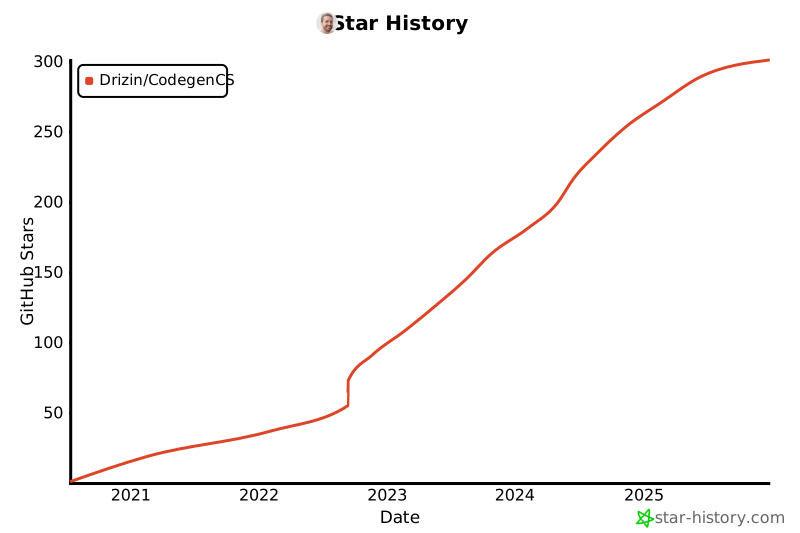
# Stargazers over time
[](https://star-history.com/#Drizin/CodegenCS&Date)
# License
MIT License
That means you're free to do what you want - but consider [buying me a coffee](https://github.com/sponsors/Drizin) or [hiring me](https://rickdrizin.com/pages/Contact/) for customizations or for building a template for your company.